The presentation layer that never waits.
Taking Combine, AsyncStream and every await out of view models, presenters and stores, in SwiftUI or UIKit, and what you get back: deterministic presentation tests, no reentrancy, and code that reads like a list of decisions.
For most of human history, a message moved at the speed of a horse. A king who wanted to know whether a battle was won had to wait weeks, and while he waited, the world kept changing. Armies moved, prices rose, allies changed sides. The news still mattered when it arrived, but it described a world that was already gone. The battle had been won, and the war had moved on without him.
Empires couldn't make a horse faster, so they built a system around it. The Persians had relay stations along the Royal Road, the Romans had the cursus publicus, the Mongols had the yam: riders, fresh horses and officials whose whole job was to carry, wait and pass things on. These networks moved news far faster than any single rider could, and it was still slow by any standard we'd recognize. The ruler didn't ride with the letter. When it arrived, he read it and decided. Time was the system's problem. Decisions were his.
Our apps live in the same world. The network answers when it wants. The database tells us something changed. A Kotlin Multiplatform repository hands us a Flow that keeps talking for as long as the screen lives. And most view models, presenters and stores I've written, and most I've reviewed, ride with the letter. They await, they hold Tasks, they loop over streams. They are the ruler and the courier at the same time.
This post is about firing the courier from the presentation layer. By that I mean whatever type sits between the screen and the rest of the app and decides what the user sees. Depending on the architecture, that's a view model in MVVM, a presenter in MVP or VIPER, a store and its reducer in a Redux-style setup, or the view controller itself in plain MVC. The UI framework doesn't decide which: SwiftUI and UIKit work with any of them. The proposal is the same for all of them: keep that type synchronous, and move the waiting into a couple of small, reusable types that the composition root builds and plugs in.
To keep things concrete, the examples use MVVM with SwiftUI: a view, an @Observable view model and a repository behind it. Nothing here is specific to MVVM or to SwiftUI. Later in the post, the same code drives a UIKit screen through an MVP presenter, and the same reasoning fits a VIPER presenter, a Redux-style store or whatever your team calls that layer. When you read "view model", read it as whichever of those you use.
Everything targets iOS 17 and Swift 6.2 with complete concurrency checking. All the code comes from a small Swift package with tests; where a snippet is trimmed, it says so. At the end there's a note on iOS 16.
A repository that never stops talking
Let's start with something small enough to hold in your head. A list of bookmarks, and a repository that sends the whole list now, and again every time it changes. A delete takes a moment and then the list arrives again without the deleted item.
struct Bookmark: Identifiable, Equatable, Sendable {
    let id: String
    let title: String
    let url: URL
}

protocol BookmarksRepository: Sendable {
    func bookmarks() -> AsyncThrowingStream<[Bookmark], Error>
    func delete(id: Bookmark.ID) async throws
}
This shape is common, though it's rarely free. A SwiftData or Core Data observation has to be wrapped in a stream, and its model objects mapped into plain Sendable values before they can cross actors. A Kotlin Flow needs a bridge such as SKIE or KMP-NativeCoroutines before Swift can iterate it, and its Kotlin types usually get mapped too. A WebSocket needs decoding. Once that work is done, you tend to end up here: one endless stream of plain values, plus a few one-shot effects that change what the stream will say next.
Here's a fake one we can actually run. It's an actor that keeps the list and pushes it to every observer:
actor InMemoryBookmarksRepository: BookmarksRepository {
    private var items: [Bookmark]
    private var continuations: [UUID: AsyncThrowingStream<[Bookmark], Error>.Continuation] = [:]

    init(_ items: [Bookmark]) {
        self.items = items
    }

    nonisolated func bookmarks() -> AsyncThrowingStream<[Bookmark], Error> {
        AsyncThrowingStream { continuation in
            let id = UUID()
            Task { await self.add(continuation, id: id) }
            continuation.onTermination = { _ in
                Task { await self.remove(id) }
            }
        }
    }

    func delete(id: Bookmark.ID) async throws {
        try await Task.sleep(for: .milliseconds(300))
        items.removeAll { $0.id == id }
        continuations.values.forEach { $0.yield(items) }
    }

    private func add(_ continuation: AsyncThrowingStream<[Bookmark], Error>.Continuation, id: UUID) {
        continuations[id] = continuation
        continuation.yield(items)
    }

    private func remove(_ id: UUID) {
        continuations[id] = nil
    }
}
Nothing clever. The point is that it never finishes on its own.
Calling the repository from the view model
This is one way we could call our repository from a view model:
@MainActor
@Observable
final class BookmarksViewModel {
    private(set) var bookmarks: [Bookmark] = []
    private(set) var isLoading = false
    private(set) var errorMessage: String?

    private let repository: any BookmarksRepository

    init(repository: any BookmarksRepository) {
        self.repository = repository
    }

    func observe() async {
        isLoading = true
        do {
            for try await bookmarks in repository.bookmarks() {
                self.bookmarks = bookmarks.sorted { $0.title < $1.title }
                isLoading = false
            }
        } catch {
            errorMessage = "Couldn't load your bookmarks."
            isLoading = false
        }
    }

    func delete(_ id: Bookmark.ID) async {
        errorMessage = nil
        do {
            try await repository.delete(id: id)
        } catch {
            errorMessage = "Couldn't delete it. Try again."
        }
    }
}
And the view drives it the way SwiftUI wants: .task starts the observation when the view appears and cancels it when the view goes away.
struct BookmarksView: View {
    @State var viewModel: BookmarksViewModel

    var body: some View {
        List(viewModel.bookmarks) { bookmark in
            Text(bookmark.title)
                .swipeActions {
                    Button("Delete", role: .destructive) {
                        Task { await viewModel.delete(bookmark.id) }
                    }
                }
        }
        .task { await viewModel.observe() }
    }
}
This is good code. It compiles under Swift 6 with complete concurrency checking, .task takes care of cancellation, and the screen can't leave a loop running behind it.
Still, a few things stay hard, and they tend to show up later, in a bug report or a red CI run.
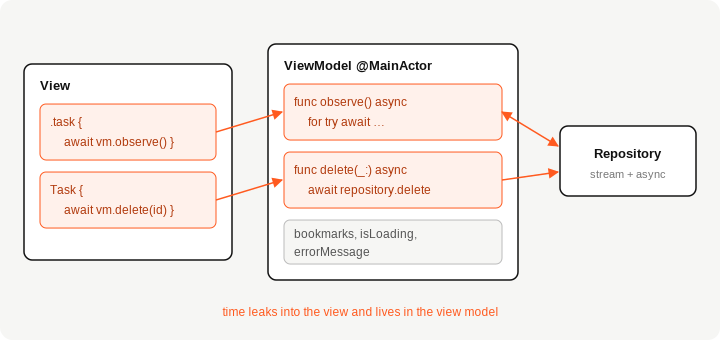
The view has to know about time
The view model's API is async, so the view has to deal with it. .task works for the stream, because it runs while the view is on screen. A button is different: its action is a plain synchronous closure, so every button that changes something needs a Task { } around the call, or a @State value that triggers a .task(id:). Either way, the view is now scheduling work.
And the screen is only correct if the view picks the right tool. Call observe() from onAppear inside a plain Task and nothing cancels it. I wrote a test to be sure, and the view model stays alive after its screen is gone. The Task in the button isn't cancelled either: if the user leaves while a delete is running, it keeps going, and keeps the view model in memory until it finishes.
This spreads, and Swift does it on purpose. async in a signature tells every caller that the call can suspend, which is exactly the information you want. The price is that whoever calls it has to be async too, or wrap it in a Task. The protocol the view sees gets async methods, the preview stub needs them, the parent screen that composes this one has to know. I call it an async explosion. It isn't a flaw in the language. It's the cost of making suspension visible, and it's fair to ask which layers should pay it.
Every await is a place where the world can change
Look at delete. It clears the error, waits, and maybe sets the error again. While it waits, the stream can deliver a new list, the user can tap delete again, or the screen can disappear. When the await returns, the method carries on with what it knew before it started waiting.
A double tap is enough to see it. Two calls to delete with the same id both reach the repository, because nothing in the view model knows a delete is already running:
@Test
func aDoubleTapDeletesTwice() async {
    let repository = SlowDeleteRepository()
    let sut = BookmarksViewModel(repository: repository)

    async let first: Void = sut.delete(docs.id)
    async let second: Void = sut.delete(docs.id)
    _ = await (first, second)

    #expect(repository.deletes == [docs.id, docs.id])
}
It passes, which means both deletes reach the repository. Swift's actors, the main actor included, prevent data races: two threads touching the same memory at the same time. They don't prevent this, and they're not meant to. Actors are reentrant by design: while one call is suspended, another can run. That's what keeps them from deadlocking. It also means a method with an await in the middle isn't one step but several, and other work can happen between them. You can add an isDeleting flag, of course, and it works. It's just one more thing to get right at every suspension point, in every view model.
The main actor does the mapping
observe() belongs to a @MainActor class, so everything inside the loop runs on the main actor, including the sorted call. Sorting a few bookmarks is nothing. Mapping a few thousand Kotlin objects into Swift models every time the database changes is something your scrolling will notice. You can move that work off the main actor from inside the view model, too. The question is whether every view model should have to remember to.
The tests have to wait
Here's how you might test the first behavior, that the list shows what the repository sends:
@Test
func showsEveryListTheRepositorySends() async throws {
    let repository = StreamRepository()
    let sut = BookmarksViewModel(repository: repository)
    let observation = Task { await sut.observe() }

    repository.continuation.yield([docs, talk])
    try await waitUntil { sut.bookmarks == [docs, talk] }

    observation.cancel()
    await observation.value
}
observe() never returns while the stream is open, so the test starts it in a Task, waits for the new value, and at the end cancels the task and awaits it, so nothing is still running when the next test starts. Here I wait by polling with waitUntil, which passes in about 12 ms on my machine and is usually fine on CI too, until the day the runner is slow.
Polling isn't the only option. A continuation that resumes when the property changes, an XCTestExpectation fulfilled at the right moment, or a signal type built for tests can make this deterministic, and plenty of teams write those well. But each of them is synchronization code, written around a loop that never ends, per test, per screen. Combine tests have the same shape with sink, receive(on:) and expectations. The tool changes, the waiting stays.
It only works where .task exists
.task is a SwiftUI modifier. A UIKit view controller, a presenter, a coordinator or a store doesn't get one. There, someone has to create the task, keep it, and cancel it at the right moment, by hand, on every screen. The view model behaves well as long as it's used from the one place that manages its lifetime for it.
A different question
Instead of asking how to make that view model safe, I find it more useful to ask what a view model, or a presenter, or a store, actually does.
It holds state. It receives something: a tap, a list, an error. It decides what the new state is and, sometimes, what should happen next. That's a function. State and event in, new state and intentions out. A function like that doesn't need to know about time at all.
Time is the courier's job. Someone has to read the stream, wait for the delete, hop to the main actor and keep the work alive exactly as long as the screen needs it. That's real work, and it's the same work on every screen. So it shouldn't be written on every screen.
Picture a presenter that only has methods like didStartLoading() and didFinishLoading(with:). It never calls a loader. A small adapter runs the async loader and calls those methods when the answer arrives. The presenter can't tell whether the data came from a server, a cache or a test, or how long it took. You test it by calling a method and checking the output.
That's the design we're going to build, one step at a time.
Step 1: results arrive as actions
The first change is about vocabulary. Everything the view model can react to becomes one enum, including the answers from the outside world:
enum BookmarksAction: Equatable, Sendable {
    // what a person does
    case appear
    case disappear
    case delete(Bookmark.ID)
    // what the world answers
    case loaded([Bookmark])
    case loadFailed
    case deleteFailed(Bookmark.ID)
}
And the view model gets a single entry point:
func handleAction(_ action: BookmarksAction)A new list from the repository isn't something the view model goes and gets. It's something that happens to it, the same way a tap does. That's the whole trick.
It also puts every change to the screen's state through one switch, on the main actor, one action at a time. Since there's no await inside handleAction, there's nothing for a second action to slip into: each one runs from start to finish before the next begins.
A note on granularity. To keep the example small, one enum and one view model handle everything on this screen. In a bigger app, it often pays to split that up by concern. Instead of one state, the presentation layer talks to a few tiny protocols, each with its own small view model:
@MainActor
protocol ResourceLoadingView {
    func display(_ viewModel: ResourceLoadingViewModel)   // isLoading
}

@MainActor
protocol ResourceErrorView {
    func display(_ viewModel: ResourceErrorViewModel)     // message?
}

@MainActor
protocol ResourceView {
    associatedtype ResourceViewModel
    func display(_ viewModel: ResourceViewModel)          // the data itself
}
The composition root then decides who implements each one. The same view controller can be the loading view and the error view, while a separate adapter turns the resource into rows. Loading and error handling become reusable across screens, and each piece can be tested on its own. Every one of those pieces can still be synchronous. These protocols aren't part of the example package, so treat them as a sketch.
Step 2: a stream the screen watches while it needs it
The view model still needs to say "start watching" and "stop watching". It shouldn't know what it watches or how. So it gets a protocol with exactly those words:
@MainActor
protocol Observing<Event>: AnyObject {
    associatedtype Event
    func start(dispatch: @escaping (Event) -> Void)
    func cancel()
}
The real implementation reads a stream, maps each value into an event off the main actor, and delivers the event on it:
@MainActor
final class ObservationTask<Value: Sendable, Event: Sendable>: Observing {
    private let observe: @Sendable () -> AsyncThrowingStream<Value, Error>
    private let map: @Sendable (Value) -> Event
    private let mapError: @Sendable (Error) -> Event

    private var task: Task<Void, Never>?

    init(observe: @escaping @Sendable () -> AsyncThrowingStream<Value, Error>,
         map: @escaping @Sendable (Value) -> Event,
         mapError: @escaping @Sendable (Error) -> Event) {
        self.observe = observe
        self.map = map
        self.mapError = mapError
    }

    deinit {
        task?.cancel()
    }

    func start(dispatch: @escaping (Event) -> Void) {
        task?.cancel()
        let observe = self.observe, map = self.map, mapError = self.mapError

        task = Task {
            do {
                for try await value in observe() {
                    let event = await Self.transform(value, with: map)
                    guard !Task.isCancelled else { return }
                    dispatch(event)
                }
            } catch {
                guard !Task.isCancelled else { return }
                dispatch(mapError(error))
            }
        }
    }

    func cancel() {
        task?.cancel()
        task = nil
    }

    @concurrent
    private nonisolated static func transform(_ value: Value,
                                              with map: @Sendable (Value) -> Event) async -> Event {
        map(value)
    }
}
A few choices in there deserve a word.
Why a plain Task and not Task.detached. My first version used Task.detached to get the loop off the main actor. That works, but a detached task starts from nothing: it doesn't inherit the caller's priority or its task-local values, and it isn't tied to the actor that created it, so every delivery needs an explicit hop back. A plain Task created here inherits the priority and the task locals, and runs on the main actor, so dispatch can be called directly. Only the mapping, the part that can be expensive, leaves the main actor, through a @concurrent function. That attribute needs Swift 6.2. On older compilers, a nonisolated async function gives you the same behavior today, but that default is changing, which is why I'd rather say it out loud.
No late events. start, cancel and the check before dispatch all run on the main actor. So once cancel() returns, or a new start has replaced the old task, the old task can't deliver anything: when it comes back from mapping, it finds itself cancelled and stops. There's a test in the package for each of those two cases.
Who decides when to stop. The deinit cancels the task, but that's a safety net, not the mechanism. A view model isn't guaranteed to go away when its screen does: a navigation path, a parent or a cache can keep it around. So stopping is an explicit decision, made by the view model when it receives .disappear:
case .appear:
    isLoading = bookmarks.isEmpty
    observer.start { [weak self] in self?.handleAction($0) }

case .disappear:
    observer.cancel()

case .loaded(let bookmarks):
    self.bookmarks = bookmarks
    isLoading = false
What counts as "disappear" is the view's call, and it's not always the obvious one. In SwiftUI, onDisappear also fires when another tab is selected or a view covers this one in some containers. Here that's fine: the stream sends the whole list again when the screen comes back, so stopping and restarting costs little. If restarting were expensive, I'd keep observing and send .disappear only when the screen is really closed. The UIKit version later in the post does exactly that.
Step 3: a one-shot effect
Deleting is different. It isn't a stream, it's a single thing that happens and then is over. And the person who tapped doesn't care how long it takes; they want the row to look busy and then disappear. So it gets its own small protocol:
protocol Commanding<Input>: AnyObject {
    associatedtype Input
    func send(_ input: Input)
}

final class CommandTask<Input: Sendable>: Commanding, Sendable {
    private let perform: @Sendable (Input) async -> Void

    init(perform: @escaping @Sendable (Input) async -> Void) {
        self.perform = perform
    }

    func send(_ input: Input) {
        let perform = self.perform
        Task { await perform(input) }
    }
}
send returns immediately. The task isn't cancelled when the screen goes away, on purpose: a delete or a save should finish even if the person has already left. The view model doesn't learn how the delete went from a return value. It learns the way it learns everything else, from an action.
That changes how we model the delete. In the async version, "a delete is running" wasn't written anywhere: it only existed while the code sat suspended at the await. Now it has to be state. A delete is in progress from the tap until the row is gone from the list, or until it fails:
@MainActor
@Observable
final class BookmarksViewModel {
    private(set) var deleting: Set<Bookmark.ID> = []
    // bookmarks, isLoading, errorMessage, observer and deleteCommand as before

    func handleAction(_ action: BookmarksAction) {
        switch action {
        // .appear, .disappear and .loadFailed as before

        case .delete(let id):
            guard !deleting.contains(id) else { return }
            errorMessage = nil
            deleting.insert(id)
            deleteCommand.send(id)

        case .loaded(let bookmarks):
            self.bookmarks = bookmarks
            // A delete is over once its row is gone from the list.
            deleting = deleting.filter { id in bookmarks.contains { $0.id == id } }
            isLoading = false

        case .deleteFailed(let id):
            deleting.remove(id)
            errorMessage = "Couldn't delete it. Try again."
        }
    }
}
I got this wrong in an earlier draft, and the mistake is worth showing. That version had the command report success with a .deleted(id) action, and freed the row when it arrived. It looked simpler. But the command's answer and the new list travel separately, and nothing says which one arrives first. If .deleted came first, the row was still on screen and no longer busy, and a second tap would send a second delete. Ending the delete when the list confirms it closes that gap. The command only reports what the stream can't: failure.
So what exactly does this design remove? Reentrancy inside the view model. handleAction has no await, so the check and the insert in .delete happen in one uninterrupted step, and a double tap can't get between them. What it doesn't remove is ordering between effects. The stream and the command are separate pieces of async work, and their answers can arrive in either order. That still has to be modeled, as the .deleted story shows. The difference is where you model it: in a switch over plain values, where each order can be tested on its own, instead of across suspension points inside a method.
In this example the order can't break the state because each piece of state has one source. bookmarks only ever comes from the stream. deleting only changes on a tap, on a failure, or when a list arrives without the row. No answer has to undo another.
Step 4: the composition root plugs it together
Somebody has to plug the real repository into those two primitives, and it's neither the view nor the view model. That job belongs to the composition root: the one place that's allowed to know every concrete type.
@MainActor
enum BookmarksComposer {
    static func makeViewModel(repository: any BookmarksRepository) -> BookmarksViewModel {
        let dispatcher = ActionDispatcher<BookmarksAction>()
        let viewModel = BookmarksViewModel(
            observer: makeObserver(repository: repository),
            deleteCommand: makeDeleteCommand(repository: repository, dispatcher: dispatcher)
        )
        dispatcher.connect { [weak viewModel] in viewModel?.handleAction($0) }
        return viewModel
    }

    private static func makeObserver(repository: any BookmarksRepository) -> ObservationTask<[Bookmark], BookmarksAction> {
        ObservationTask(
            observe: { repository.bookmarks() },
            map: { .loaded($0.sorted { $0.title < $1.title }) },
            mapError: { _ in .loadFailed }
        )
    }

    private static func makeDeleteCommand(repository: any BookmarksRepository,
                                          dispatcher: ActionDispatcher<BookmarksAction>) -> CommandTask<Bookmark.ID> {
        CommandTask { id in
            do {
                try await repository.delete(id: id)
            } catch {
                await dispatcher.send(.deleteFailed(id))
            }
        }
    }
}

@MainActor
final class ActionDispatcher<Action: Sendable> {
    private var handle: ((Action) -> Void)?

    func connect(_ handle: @escaping (Action) -> Void) {
        self.handle = handle
    }

    func send(_ action: Action) {
        handle?(action)
    }
}
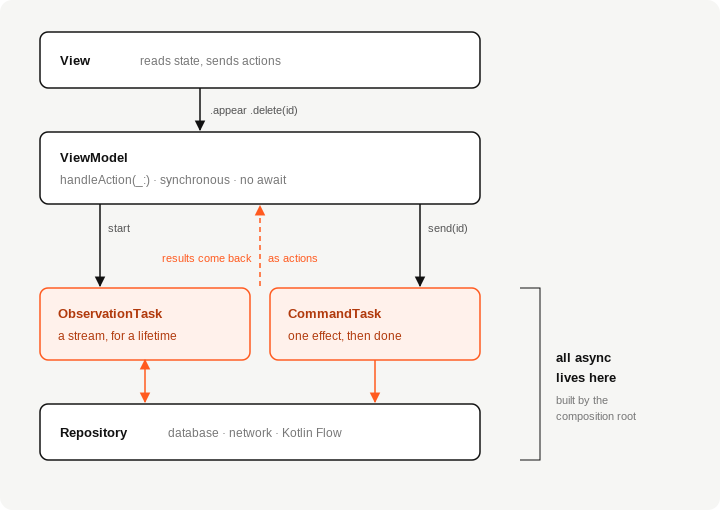
It's worth being precise about who does what here. The composer doesn't run anything. It builds the pieces and connects them, and then it's done. The concurrency itself lives in ObservationTask and CommandTask: they own the tasks, the cancellation and the hop back to the main actor. Those two are generic and reusable. The composer is per screen, and it's mechanical.
A few decisions hide in there:
- The mapping lives here. Sorting by title is presentation logic, but it's a pure function, and
ObservationTaskruns it off the main actor. - Only failure comes back through the dispatcher. Success is confirmed by the stream, as we saw in Step 3.
- The dispatcher knows nothing about the view model. It's generic over the action and holds a closure, and the composer makes that closure capture the view model weakly. If the screen is gone when the delete finishes, the answer has nowhere to go and is dropped. The same dispatcher type wires the UIKit presenter later on.
The view is what you'd expect (the row view is omitted here):
struct BookmarksView: View {
    @State var viewModel: BookmarksViewModel

    var body: some View {
        List(viewModel.bookmarks) { bookmark in
            BookmarkRow(bookmark, isBusy: viewModel.deleting.contains(bookmark.id))
                .swipeActions {
                    Button("Delete", role: .destructive) {
                        viewModel.handleAction(.delete(bookmark.id))
                    }
                }
        }
        .overlay { if viewModel.isLoading { ProgressView() } }
        .onAppear { viewModel.handleAction(.appear) }
        .onDisappear { viewModel.handleAction(.disappear) }
    }
}
No Task in the button and no .task modifier. The view only reports what happened.
What the view model no longer imports
Look at the top of the view model file:
import Foundation
import Observation
No import Combine. No AsyncStream, no for await, no Task, no async or await anywhere in the class. Not even in the protocols it depends on: Observing.start(dispatch:) and Commanding.send(_:) are plain synchronous methods. The view model doesn't know that a stream exists, let alone which kind.
That changes what the view model depends on:
- The concurrency tool becomes replaceable. If the repository moves from Combine to async/await, or a Kotlin
Flowgets bridged differently, only the primitives and the composer change. The view model and its tests don't move a line. - Modules get honest boundaries. In a modular app, the presentation module can be compiled and tested without Combine, without the Kotlin framework, without the data layer at all. The app target is the only place that sees both sides and plugs them together.
- It's easy to check in review. In this architecture, a view model, presenter or store that contains
await,Task,AsyncStream,sinkorimport Combinemeans something leaked, and you can grep for it.
That last point is a rule of this architecture, not a rule of Swift. A view model that coordinates a couple of tasks with explicit cancellation can be perfectly sound. I come back to that below.
What the tests look like now
This is the part that convinced me. Two tiny stubs replace the primitives. Each one records every message it receives, in order, in a messages array, so a test can check not just whether something was asked, but what, how many times and in which sequence. The observing stub also lets the test speak on behalf of the outside world:
@MainActor
final class ObservingStub<Event>: Observing {
    enum Message: Equatable {
        case start
        case cancel
    }

    private(set) var messages: [Message] = []
    private var dispatch: ((Event) -> Void)?

    func start(dispatch: @escaping (Event) -> Void) {
        messages.append(.start)
        self.dispatch = dispatch
    }

    func cancel() {
        messages.append(.cancel)
    }

    func emit(_ event: Event) {
        dispatch?(event)
    }
}

final class CommandingStub<Input: Equatable>: Commanding {
    enum Message: Equatable {
        case send(Input)
    }

    private(set) var messages: [Message] = []

    func send(_ input: Input) {
        messages.append(.send(input))
    }
}
And the tests read like a description of the screen:
@Test
func appearingStartsObservingAndDisappearingStopsIt() {
    let (sut, observer, _) = makeSUT()

    sut.handleAction(.appear)
    sut.handleAction(.disappear)

    #expect(observer.messages == [.start, .cancel])
}

@Test
func showsEveryListTheRepositorySends() {
    let (sut, observer, _) = makeSUT()
    sut.handleAction(.appear)

    observer.emit(.loaded([docs, talk]))
    #expect(sut.bookmarks == [docs, talk])

    // docs was deleted elsewhere: the repository sends the whole list again
    observer.emit(.loaded([talk]))
    #expect(sut.bookmarks == [talk])
}

@Test
func aDeleteStaysInProgressUntilTheRowLeavesTheList() {
    let (sut, observer, command) = makeSUT()
    sut.handleAction(.appear)
    observer.emit(.loaded([docs, talk]))
    sut.handleAction(.delete(docs.id))

    // an unrelated change arrives before the delete lands
    observer.emit(.loaded([docs, talk, paper]))
    sut.handleAction(.delete(docs.id))
    #expect(sut.deleting == [docs.id])
    #expect(command.messages == [.send(docs.id)])

    observer.emit(.loaded([talk, paper]))
    #expect(sut.deleting.isEmpty)
}
No async, no await, no timeout, no expectation. Each test runs in about a millisecond, and it takes about a millisecond on a slow CI machine too, because there's nothing to wait for.
The third test is the ordering problem from Step 3, written out. An unrelated list arrives while the delete is in flight, the person taps again, and only then does the confirming list arrive. In the async version, a test like that means arranging two concurrent things and hoping they interleave the way you planned. Here, you are the scheduler. You decide what arrives and in which order, one line at a time.
To be fair about what this buys: it removes a class of synchronization problems from presentation tests, not from async testing in general. ObservationTask and CommandTask still need async tests: that mapping happens off the main actor, that dispatch happens on it, that a cancelled or replaced observation delivers nothing. One of those, the one that checks nothing arrives after cancel(), even waits 50 ms, because there's no signal to await for an event that must never come. The difference is that those tests are written once, for the whole app, and every new screen gets the synchronous kind.
On top of that I keep one integration test per screen that wires the composer to a real in-memory repository, taps delete, and waits for the row to go. That's the only place a waitUntil survives, and it checks the wiring, not the logic.
Same decisions, UIKit screen
Nothing above depends on SwiftUI, or on MVVM. To show it, here's the same screen with both changed: UIKit instead of SwiftUI, and MVP instead of MVVM. A presenter pushes state to a view controller instead of exposing observable properties. The pairing is arbitrary; the presenter would drive a SwiftUI view just as well, and the view model could back a view controller.
The presenter talks to its view through a protocol that only knows how to display a state:
struct BookmarksScreenState: Equatable {
    var bookmarks: [Bookmark] = []
    var deleting: Set<Bookmark.ID> = []
    var isLoading = false
    var errorMessage: String?
}

@MainActor
protocol BookmarksDisplaying: AnyObject {
    func display(_ state: BookmarksScreenState)
}
The presenter makes the same decisions as the view model. The difference is that its state is private, and every action ends by sending it to the view. Trimmed to the cases that differ:
@MainActor
final class BookmarksPresenter {
    weak var view: BookmarksDisplaying?

    private var state = BookmarksScreenState()
    private let observer: any Observing<BookmarksAction>
    private let deleteCommand: any Commanding<Bookmark.ID>

    init(observer: any Observing<BookmarksAction>,
         deleteCommand: any Commanding<Bookmark.ID>) {
        self.observer = observer
        self.deleteCommand = deleteCommand
    }

    func handleAction(_ action: BookmarksAction) {
        switch action {
        case .appear:
            state.isLoading = state.bookmarks.isEmpty
            observer.start { [weak self] in self?.handleAction($0) }
        case .disappear:
            observer.cancel()
        // .delete, .loaded, .loadFailed and .deleteFailed: the same rules as the
        // view model, applied to `state`
        }
        view?.display(state)
    }
}
The view controller forwards what the person does and renders what it's given. This is where "disappear" gets the careful definition from Step 2: being covered by another screen doesn't stop the observation, only being popped or dismissed does.
final class BookmarksViewController: UITableViewController, BookmarksDisplaying {
    var presenter: BookmarksPresenter?
    private var state = BookmarksScreenState()

    override func viewWillAppear(_ animated: Bool) {
        super.viewWillAppear(animated)
        presenter?.handleAction(.appear)
    }

    override func viewDidDisappear(_ animated: Bool) {
        super.viewDidDisappear(animated)
        if isMovingFromParent || isBeingDismissed || navigationController?.isBeingDismissed == true {
            presenter?.handleAction(.disappear)
        }
    }

    func display(_ state: BookmarksScreenState) {
        self.state = state
        tableView.reloadData()
    }

    override func tableView(_ tableView: UITableView,
                            commit editingStyle: UITableViewCell.EditingStyle,
                            forRowAt indexPath: IndexPath) {
        presenter?.handleAction(.delete(state.bookmarks[indexPath.row].id))
    }

    // numberOfRowsInSection and cellForRowAt read from `state` (omitted)
}ObservationTask, CommandTask, ActionDispatcher, the action enum and the stubs are the same files. The composer gets a makePresenter next to makeViewModel, built from the same two helpers, with dispatcher.connect { [weak presenter] in presenter?.handleAction($0) }. And there's no DispatchQueue.main.async before reloadData(): every action reaches the presenter on the main actor, because that's where ObservationTask delivers and where ActionDispatcher runs.
The presenter's tests look like the view model's, with the same stubs and a spy in the place of the view:
@Test
func aDoubleTapSendsOneDelete() {
    let (sut, view, _, command) = makeSUT()

    sut.handleAction(.delete(docs.id))
    sut.handleAction(.delete(docs.id))

    #expect(command.messages == [.send(docs.id)])
    #expect(view.displayed.last?.deleting == [docs.id])
}
The presenter doesn't import UIKit, so these tests run on a Mac without a simulator. A store in a Redux-style setup can follow the same pattern: its reducer is a switch over actions that changes state, and the effects that talk to the outside world answer with more actions.
What it costs
None of this is free.
- More types. An action enum, two protocols, two primitives, a dispatcher, a composer. The primitives are written once; the composer and the actions are per screen. For a screen with one button and one request, that can feel like a lot of ceremony.
- State you used to get for free. "Is this row deleting?" was implicit in the async version. Now it's a
Setwith a rule for when it ends, and you have to get that rule right, as my.deletedmistake shows. I've come to prefer it, because that state existed all along, hidden in the call stack. But it's more to write and more to think about. - Indirection. To follow a delete from the tap to the database, you go through the view model, the command, the composer and the repository. Someone new to the codebase needs a map, and a diagram like the one above helps.
CommandTaskdoesn't cancel. It's fire and forget by design, which suits a delete or a save. Anything that should be "latest wins" or stop on dismiss fits better as an observation, or needs its answers tagged with the request they belong to, so stale ones can be dropped.- A recent toolchain.
@concurrentneeds Swift 6.2. The deployment target can stay at iOS 17, but the compiler can't be older. - Swift 6 won't catch everything. A
@MainActorclass reached through a protocol that isn't isolated, with synchronous methods, can still be called from the wrong thread without a compiler error. That's whyObservingandActionDispatcherare@MainActorhere. The tests, not the compiler, are the last line.
When this architecture is not worth it
I don't think every screen should look like this. Some cases where a view model with a Task, an await and explicit cancellation is the better choice:
- One request, no stream. A details screen that loads once from
.taskand shows the result. Anasyncload method is short, easy to read, and easy to test with a plainawait, because it returns. The primitives would add more than they remove. - Work that is structured by nature. A search field that cancels the previous query on every keystroke, or two requests started together with
async letand cancelled together. Structured concurrency expresses that directly. You can model it with observations and tagged answers, but it reads worse. - A framework that already owns effects. If you use The Composable Architecture or something like it, its effect system plays the role of
CommandTaskandObservationTask. Adding these on top would duplicate it. - A small app or an early prototype. If there are three screens and one person, the indirection costs more than the consistency gives back. The pattern pays off when many screens repeat the same waiting.
The question I ask is how many screens will pay for the waiting, and how often someone will have to test it. When the answer is "most of them, all the time", I give the waiting to a couple of types. When it's "this one, once", a Task in the view model is fine.
If you're still on iOS 16
@Observable needs iOS 17. On iOS 16, make the view model an ObservableObject and mark its state @Published. handleAction, the action enum, Observing, Commanding and the composer don't change at all, because none of them ever knew how the view observes state. The part that depends on the OS version is the thinnest one.
The ruler doesn't ride with the letter
Back to the empires for a second. The relay stations did make letters faster. But what made them work as a system was that the person deciding didn't have to manage the slowness himself. The route, the horses and the waiting were someone else's problem, solved once and reused for every letter.
A view model, a presenter, a store: whatever decides what the screen shows is a decision-maker. Let it read the letter and decide. Give the waiting to a couple of small, well-tested types, let the composition root plug them in, and let every screen after that be a switch.